
Dashboard · Product · Brand
Your blueprint, not a guess.
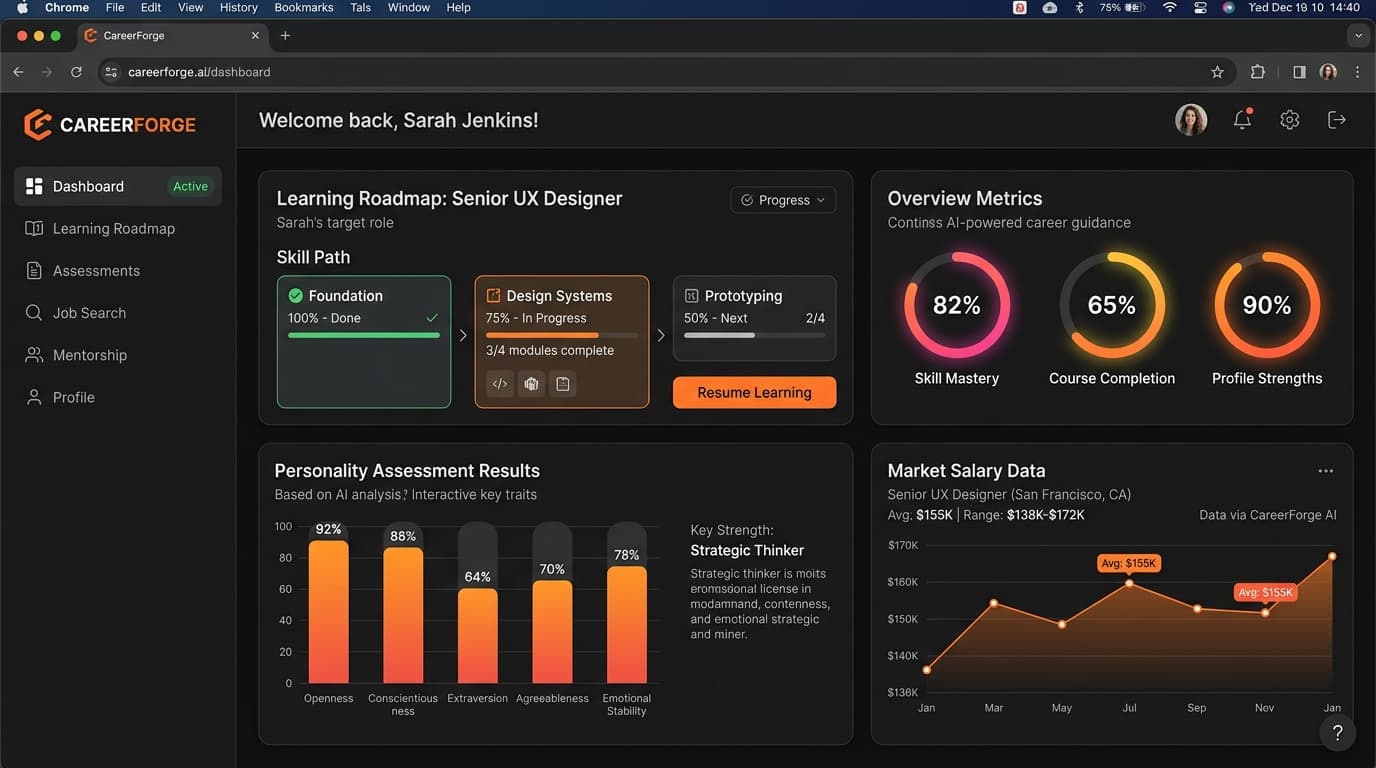
We designed CareerForge as a complete career-guidance product: two psychometric assessments, live Pakistani salary and demand data, and a dashboard that turns the result into a roadmap.
- Client
- CareerForge
- Sector
- EdTech · career guidance
- Year
- 2026
- Scope
- Product strategy
- UX & UI design
- Dashboard system
- Data visualisation
[01]Project overview
Before a career,comes a choice.Make it with data.
CareerForge is a career-guidance platform for students deciding what to study and where to work, in a market where the answer is rarely obvious.
Ibrandify defined the product, designed the dashboard and its roadmap, and built the visual system that keeps assessments, market data and progress consistent.
- 01Product strategy
- Core loop, principles and information architecture
- 02Assessment-to-blueprint flow
- Two assessments and market data resolved into one plan
- 03Dashboard
- Roadmap, progress ring, milestones and weekly stats
- 04Responsive design
- Desktop dashboard and a one-column phone layout
- 05Design system
- Tokens and live components for every state
- 06Motion language
- Three principles: tick, fill, lock
[02]The challenge
Most students chooseby guess.
The cost of a wrong choice is years of study, then a restart. The information to choose well exists, just never in one place.
- 01
Family advice
Well meant, and based on the market a parent knew, not the one a student will enter.
- 02
A trend
The field everyone is talking about this year is rarely the one that fits who you are.
- 03
A guess
With no real data on themselves or on the market, many students simply pick and hope.
- 04
Two worlds, no bridge
Personality tests describe people. Salary tables describe jobs. Nothing connects the two.
The opportunity
Connect who a person naturally is to what the market actually pays for.
[03]Product strategy
Personalitymeetsthe market.
CareerForge combines two deep psychometric assessments with live Pakistani salary and demand data, and resolves them into one document: the Career Blueprint.
01
Start with the person
Two assessments build a picture of temperament, interests and strengths before any career is mentioned.
02
Check it against the market
Every suggested path is weighed against live Pakistani salary and demand, so fit never ignores reality.
03
Explain, don’t just recommend
The AI says why a path fits, in plain language, so students can disagree with it and learn from that.
04
Turn a result into a route
A blueprint ends in a roadmap: ordered steps, chosen courses and milestones with dates.
User journey · from first question to first milestone
01
Discover
Takes the assessments
Two focused assessments, one on personality and one on interests and strengths.
02
Match
Reads the blueprint
Sees which paths fit, why, and what the market pays for each.
03
Plan
Opens the roadmap
Gets ordered steps with dates and a course for each.
04
Learn
Works the next step
One current step, the rest visible but locked.
05
Progress
Ticks milestones
A ring, counters and milestone bars show what moved.
Information architecture · three inputs, one blueprint
Assessment one
Personality and temperament: how you think, decide and work with people.
Assessment two
Interests and strengths: what you are drawn to and where you already excel.
Live market data
Pakistani salary ranges and hiring demand, by role and by city.
Your Career Blueprint
- 01Why this path fits you
- 02A step-by-step learning roadmap
- 03Courses chosen for each step
- 04Milestones you can tick off
[04]Brand identity
Forged fromwho you are.
A brand for a high-stakes decision: calm, exact and encouraging without hype. Voice: plain, specific, never a promise it can’t keep.
The mark · an open ring, and the path forged from it
Treatment rules
- The rising stroke is always the one signal-orange element on the mark.
- Clear space equals the stroke width of the ring, on all sides.
- The ring stays open to the right, always facing forward.
- Minimum size is 16px for the mark, 80px for the wordmark.
Colour · one signal
Void
#08090B
Canvas · case study and dark surfaces
Asphalt
#121418
Cards and panels
Lunar
#ECEAE4
Text on dark · light sections
Forge
#FF6A1A
The one signal · current step, action
Growth
#3DDC97
Completed, on track
Insight
#9D8CFF
Pending, secondary data
Typography · condensed for numbers, Inter for reading
Numeral
Big Shoulders 900 · 120/100
Display
Big Shoulders 800 · 56/52 · uppercase
Title
Big Shoulders 700 · 28/30 · uppercase
Body
Inter 400 · 16/24
Data label
Plex Mono 500 · 11/14 · +8%
Data visualisation & iconography
Data visualisation · one metric, one colour
72%
Overall progress
- Completed72%
- In progress18%
- Pending10%
Colour carries meaning, never decoration: green is done, orange is now, violet is later. Every chart reads the same way.
Iconography · 2px stroke, square caps
- Personality
- Interests
- Market
- Roadmap
- Courses
- Goals
- Locked
- Milestone
[05]Dashboard
From result toa route to follow.
The design below is the finished dashboard. Beneath it, the same screen is rebuilt live: scroll and the learner moves through the plan.
Your Learning Roadmap
Complete the steps below to stay on track.
0 of 6 steps
- 1Apr 21In progress
Master UI/UX Fundamentals
Learn the core principles of user experience design.
- 2Apr 23Locked
Build a Portfolio Website
Showcase your projects and build a strong online presence.
- 3Apr 26Locked
Advanced Design Systems
Learn scalable and consistent design systems.
- 4Apr 28Locked
Team Collaboration
Work effectively with cross-functional teams.
- 5Apr 30Locked
Advanced Prototyping
Create interactive prototypes for real-world products.
Career Progress
0%
Overall progress
Milestones
- Complete Foundation Course0/4
- Build Portfolio Website0/1
- Complete 3 Real Projects0/3
- Get a Job Interview0/1
Courses enrolled
0↑ 20%
Tasks completed
0↑ 15%
Goals achieved
0%↑ 8%
Study hours
0.0h↑ 12%
Scroll to move the learner through the roadmap: steps complete, the ring fills, milestones tick.
Key design decisions
Information architecture
Home opens on the learning roadmap, not on a menu of features. Learning Path, Courses, Projects, Goals and Analytics sit one tap away.
Roadmap
Completed, in progress and locked each have their own colour, icon and label, so state never relies on colour alone.
Locked steps
Future steps are visible but locked, showing the whole route while keeping attention on the one that matters now.
Progress
A ring, a step counter and milestone bars draw from one source of truth and animate to it. There are no streak penalties.
Colour
One signal, forge orange, marks the action and the current step. Green means done, violet means later. Nothing else competes.
Small screens
On a phone the roadmap collapses to one column with the current step first and the same hierarchy as desktop.
[06]Responsive
The same plan,in your pocket.
Most students will open CareerForge on a phone. The roadmap collapses to one column: the current step first, the rest dimmed and in order.
One current step. Everything else waits.
Desktop shows the whole journey at once. On a small screen the same hierarchy applies, with a thumb-reach primary action and no hidden navigation to find the next step.
Step 3 of 6 · Apr 26
Advanced design systems
- Master UI/UX Fundamentals
- Build a Portfolio Website
- Advanced Design Systems
- Team Collaboration
- Advanced Prototyping
[07]Design system
One kit forevery state.
Components are live. Press, type and toggle to see states: default, hover, focus, loading, success, error and disabled.
Buttons · variants
Button · states (press it)
Input · validation
Try typing a number to see the error state.
Segmented control
Toggle · badges
Modal · confirm
Spacing · 4px base
Radius · sharp by default
Elevation · light, not shadow
[08]Motion & interaction
Movement thatmeans something.
Three principles keep motion useful: it confirms, it shows progress arriving, and it directs attention. All of it respects reduced-motion settings.
Tick
Done, in one beat
Completing a step answers with a 120ms scale and a ring that expands once. Nothing loops.
Fill
Progress you watch arrive
Bars and rings animate to their value from one source, so a number and its shape never disagree.
72%
Lock
The lamp follows the step
Future steps dim to 40% so the current step is the brightest thing on screen. Hover or focus to read any of them.
[09]What changes for a student
Assess,plan,progress.
- Choosing from a list of fieldsSeeing why one path fits you
- Salary rumours from friendsLive market ranges next to every path
- Not knowing where to startA first step, with a date
- Courses picked at randomCourses matched to each roadmap step
Product
Assessments to a blueprint
Brand
An open ring and one signal
Dashboard
Roadmap, ring, milestones
Responsive
One current step on any screen
System
Tokens and live components
Next project
ROVE: Shared Travel Workspace